 Inertial
 Perspective
Professional artwork tools for everyone.
Perspective opens your print files and gives you the tools to see what's actually in them - every colour, every finish, every potential problem.
Available for macOS and Windows
The whole world uses Adobe Acrobat, including the print industry. But Acrobat was built to read documents, not complex print artwork. Perspective was built to inspect print artwork.
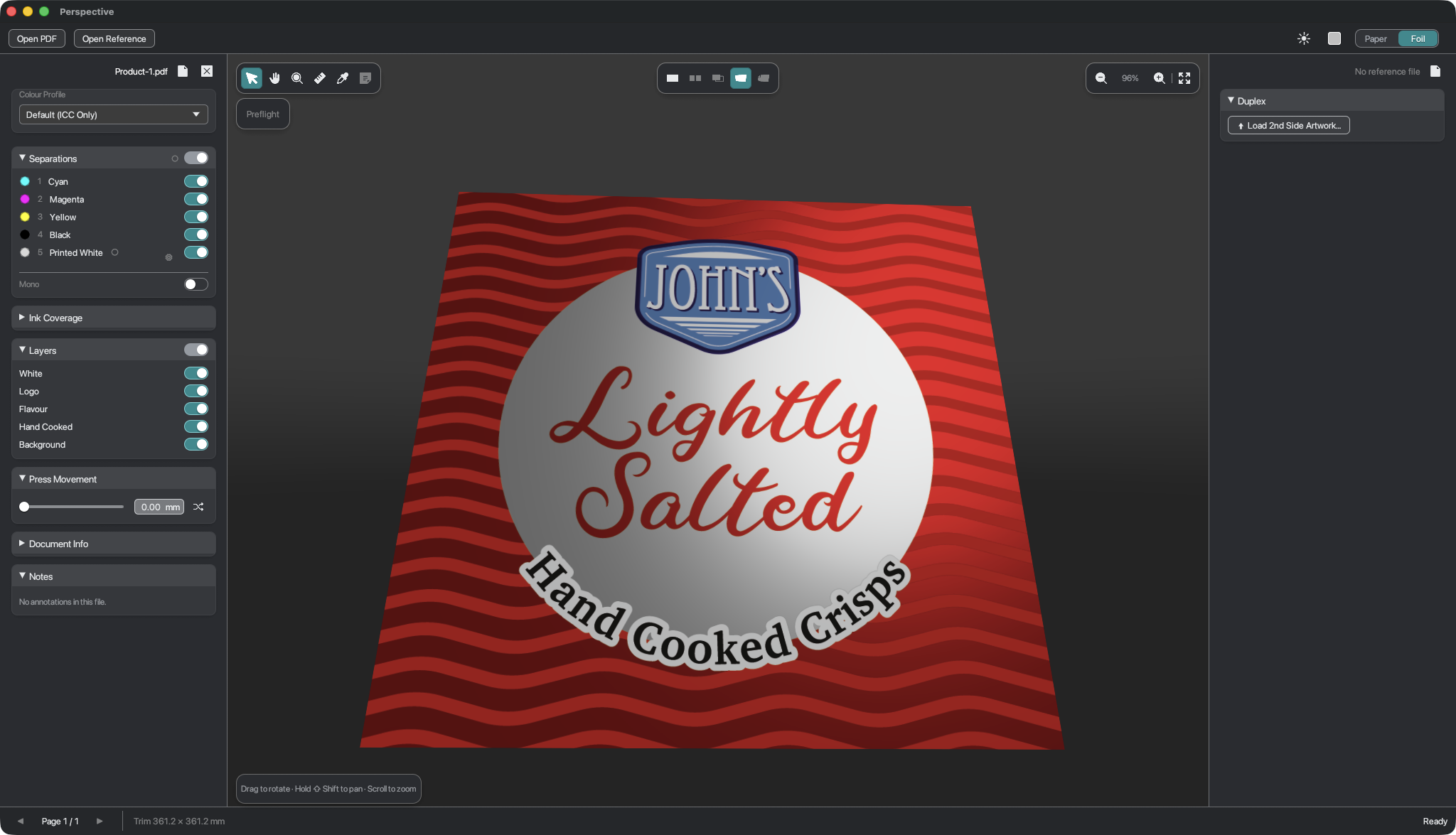
White ink on foil - live.
A "white" ink filled with a pale tint looks perfectly fine on screen - until the job comes back with that colour cast across it, and the first anyone knows is the reprint. The ink you can't see on screen is exactly the ink Perspective shows you.
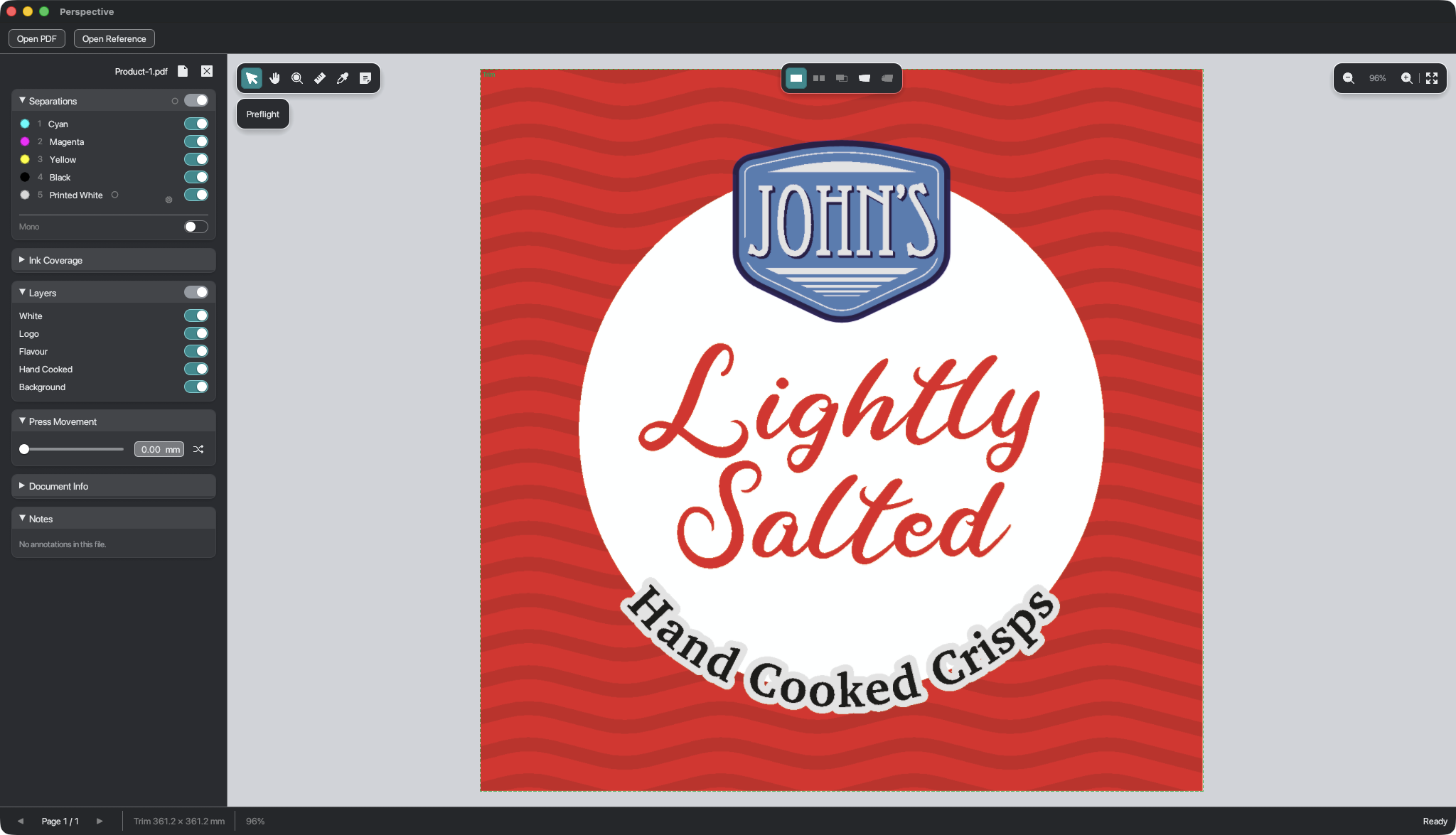
Real packaging artwork isn't one flat picture - it's built from separate layers of ink, or separations: the process colours (Cyan, Magenta, Yellow, Black), any spot colours, and a "Printed White" that acts as an opaque base on a metallic or dark surface. Without it, the colours go translucent and the foil shows through.
- Toggle Printed White off and watch the colours sink into the foil
- Toggle the CMYK colours off to see how the artwork changes
- Switch flavours to compare three different separation sets
Move your cursor over the artwork Touch and drag to move the shimmer
See misregistration before plates are made.
On press, each colour runs through a separate unit. Even fractions of a millimetre of movement between units causes colours to drift out of alignment, producing visible fringing around fine detail and type. Perspective lets you see registration error in real time - so problems are caught at proof stage, not on press.
- Try Severe to see how badly misregistration affects fine text and thin strokes
- Letters and fine linework show misreg first - look at the typography
- Switch back to In register to compare against the intended result
Read the ink at any point.
Move your cursor over the artwork to read the exact ink percentages at that point - Cyan, Magenta, Yellow, Black, and Printed White. The figures come straight from the separation data in the file - the real ink values, not a colour-managed approximation of what's on your screen. Total Area Coverage adds up the combined ink load at that point, flagging spots where there's too much ink to dry or sit cleanly on press.
- Hover the metallic circle to see where Printed White drops off and foil shows through
- Cross a solid colour band and watch all channels build up together
- Find a dark area and check the total area coverage
Move your cursor over the artwork to read ink values
Capabilities
What it can do.
-
Colours & ink
Every colour, on its own
See each colour channel separately and enable/disable them to inspect the file. Check coverage, density and use "Press Movement" to simulate the colours shifting slightly during a press run.
-
Spot, white & finishes
The channels most viewers hide
Printed white, foil, spot UV, gloss and varnish are shown as real elements - not hidden or flattened away. The parts of a job that make packaging work on dark or metallic substrates are exactly the parts you can see and check.
-
Overlays & measurement
Measure it, don't guess it
Measure anything on the page in millimetres, points or inches. Flag hairlines too thin to print reliably and images too low in resolution - before any of it becomes a problem.
-
3D sheet preview
See the finished product before it exists
An interactive 3D preview of the printed sheet, accurately lit and rendered - on paper, foil or film, with real finish simulation driven by the inks in the file. Front-and-back views, adjustable lighting. The closest thing to holding it before it goes to press.
-
Compare & preflight
Catch the change before it costs you
Drop in a reference version and compare two files visually - changes show up as a clear difference. Run automatic checks for bleed, font embedding, image quality and colour space issues.
-
Review & markup
Sign-off that stays with the file
Add notes, arrows, shapes and freehand marks directly on the artwork. Export a summary PDF with every annotation pinned to the page, or a flattened review sheet. Feedback that travels with the job - not buried in an email thread.
How it compares
What Acrobat doesn't do.
Most PDF viewers were built to read documents. Perspective was built to inspect print artwork - so the mistakes that turn into costly reprints and missed deadlines get caught at your desk, before anything goes to press.
| Capability | Acrobat Reader | Acrobat Pro | Perspective |
|---|---|---|---|
| Where Perspective stands alone | |||
| Ink coverage & over-inking heat map | Not available | Limited - single-threshold highlight only | Yes |
| White, foil, spot-UV & varnish shown as real finishes | Not available | Not available | Yes |
| Assignable channel roles (ink, white, foil, varnish) | Not available | Not available | Yes |
| Plate shift & misregistration simulation | Not available | Not available | Yes |
| Interactive 3D printed-sheet preview | Not available | Not available | Yes |
| Substrate simulation - paper, foil & film | Not available | Not available | Yes |
| Accurate lighting & colour booth simulation | Not available | Not available | Yes |
| Front-and-back duplex sheet view | Not available | Not available | Yes |
| Purpose-built for print inspection | Not available | Limited - general-purpose tool | Yes |
| Plus all the fundamentals | |||
| Opens & views any PDF | Yes | Yes | Yes |
| View individual colour channels | Not available | Yes | Yes |
| Spot colours & special inks | Not available | Yes | Yes |
| Bleed, trim & safety margin overlays | Not available | Yes | Yes |
| Low-resolution image detection | Not available | Yes | Yes |
| Automatic print checks & report | Not available | Yes | Yes |
| Version compare - visual diff of two files | Not available | Yes | Yes |
| Measure & markup tools | Limited | Yes | Yes |
Built in Limited or indirect Not available
Caught before it goes to press: over-inking, images too low in resolution, a white or finish that won't work on the substrate, a last-minute change nobody noticed, and the kind of problem that only shows up on the finished sheet.
Version compare
Spot every change between two files.
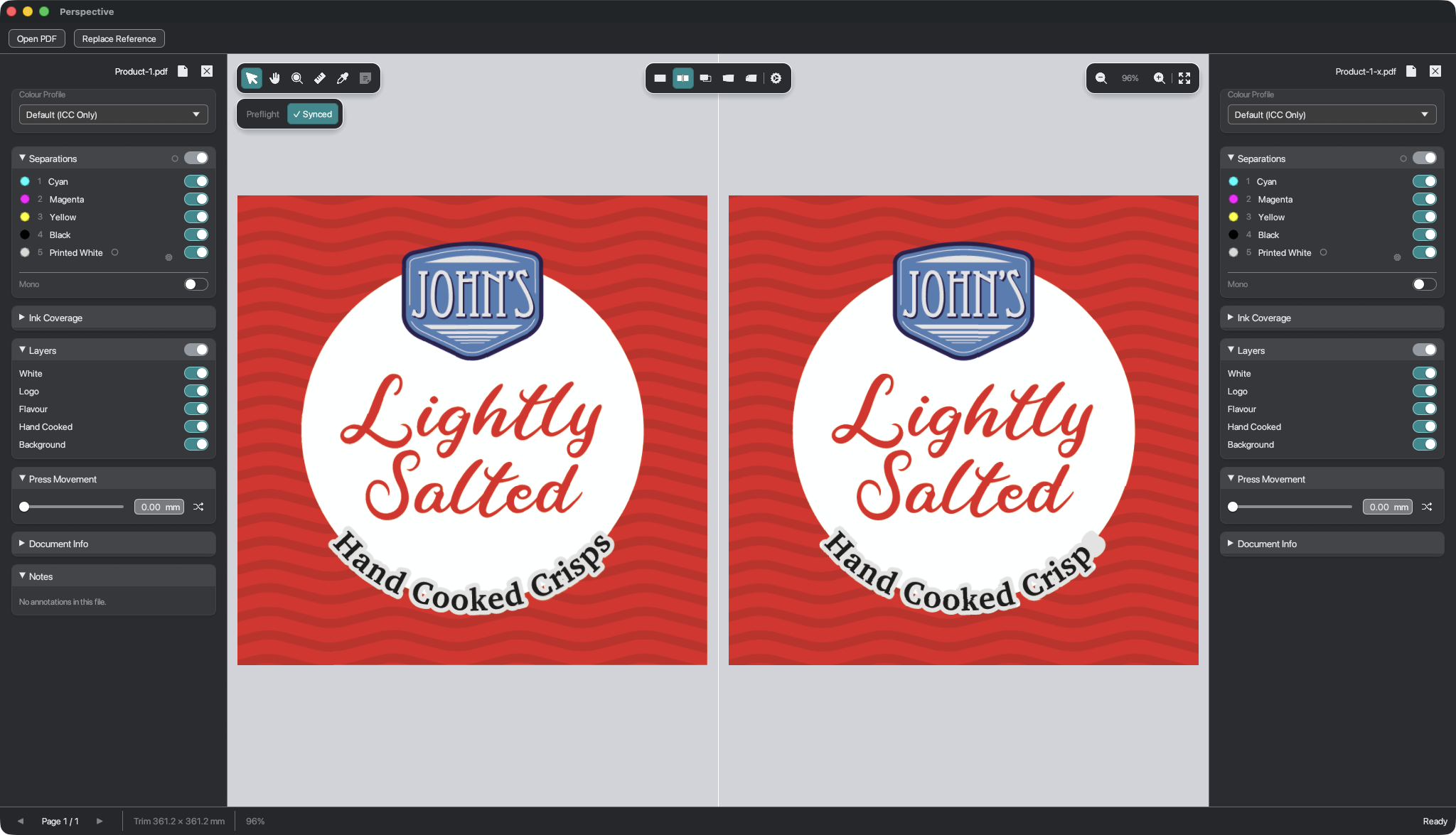
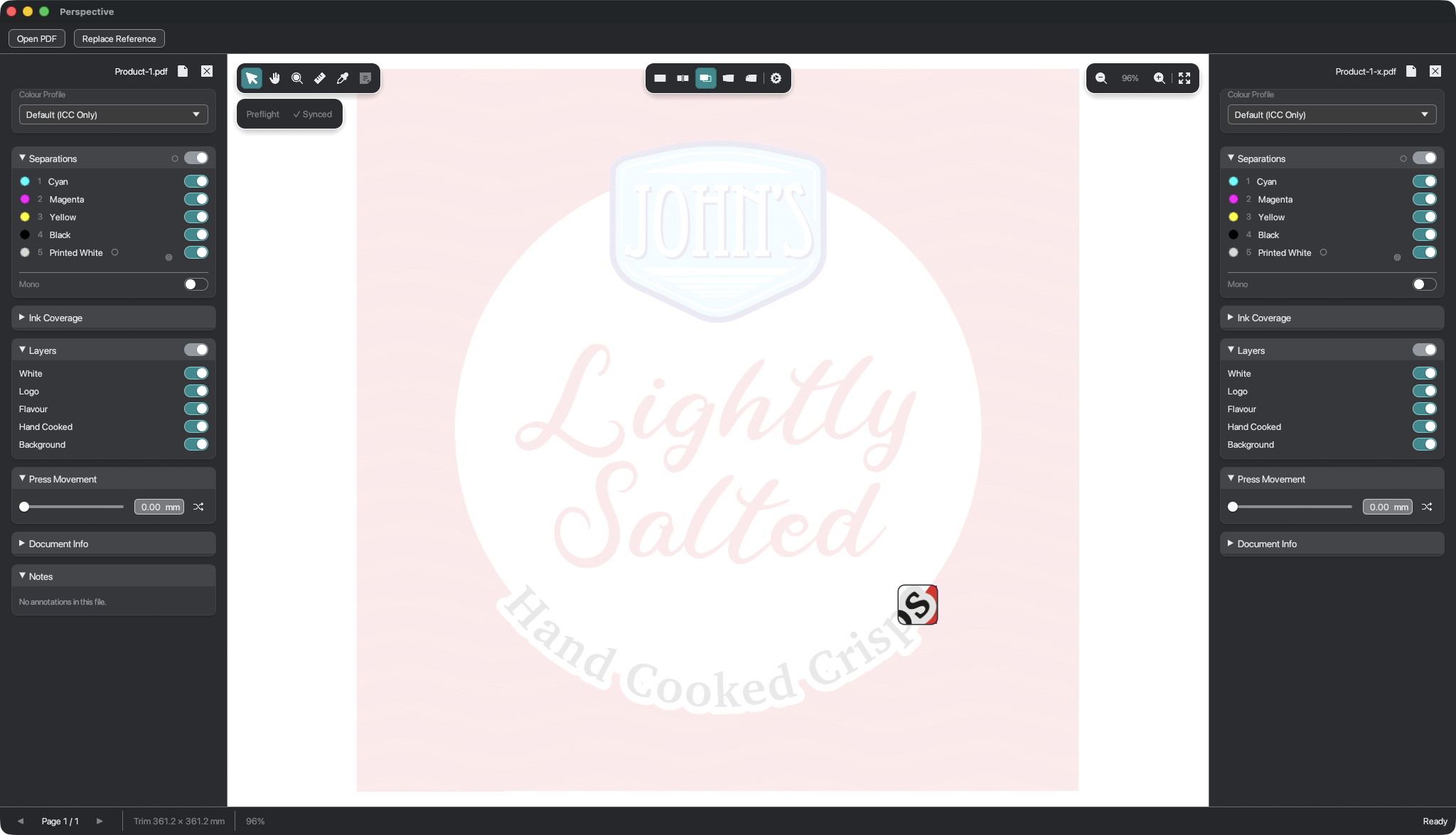
Drop in a reference version and Perspective lines the two files up automatically - even if the files have a different page size or design orientation. Review the way that suits you - both documents side by side and locked in sync, or stacked in a single overlay that fades out everything identical and leaves only what changed.
A look inside
The application.
Who it's for
Perspective was built specifically for the print managers, account handlers, decision makers and everybody else whose role relies on being able to see the artwork in a clear, informative and accurate way. You don't need to be a print expert to use it. But you'll see what they see.
Early access
Perspective is currently being tested with a small group of print professionals. A wider release will follow. If you'd like to be among the first to know when it opens — leave your email below. One message, when it matters.
Or write directly: hello@inertial.uk